Thursday, November 4, 2010

20 Amazing Websites To Share Your Photos Online

Photo sharing services make sharing, organizing and storing digital photos convenient, safe, easy and most importantly fun. Through online photo albums, friends and family can connect by sharing pictures of good times, important events and special occasions.

Here is a list of a few Photo sharing websites that are really helpful for you to upload photos. You may feel them interesting in their features. You may not be familiar with all of them, but they do have something remarkable for everyone. If you know some better photo sharing  web sites that i didn’t include, feel free to share them in the comments.

1. Photobucket

Photobucket

Photobucket can be the best place on the planet for you to sock up all your photos and videos. Photobucket is one among the leading sites on the Internet for uploading, linking, sharing and finding photos, graphics and videos. Your Photobucket account can store thousands of photos and videos for free. They can be shared through email, mobile phone and IM. It is integrated with social networking sites like Facebook, Myspace and Blogger. It has flexible uploading features and advanced mobile options.

Source

2. Flickr

Flickr

Flickr is one other popular online photo sharing site with impressive features and simplicity. It provides you with various ways to upload your photographs. Flickr let you showcase, share and store your photos with its amazing flexibility and user friendly features. Its editing tools are simple yet powerful. It offers you an option to geotag photographs and videos on maps. Its sharing tools are truly versatile.

Source

3. Fotki

Fotki

Fotki is another online photo sharing website which has many constructive features that are simple to use. You have various options to upload your photos and album creation. You can individually upload a photo or a group of pictures can be uploaded in a batch upload. You can also recover a picture from another site, use a file transfer protocol client, email your picture or send it directly from a cell phone. It is a brilliant service for someone who tries to sell prints over the web. You can access a number of valuable features that will help you share and store photographs even when you are using a free account.

Source

4. Care to Connect

Care to Connect

Care2 Connect is a global network of over 4 million individuals, thousands of eco–friendly companies and hundreds of nonprofit organizations. You can join this online community for free. You can share your images and photos with friends, family and others. You can upload your photos in a batch upload or individually. It allows you to upload about 200 photos in 30 days. There are restrictions to the content type of your photos or images. This site doesn’t allow obscene or pornographic images or photos.

Source

5. Webshots

Webshots

Webshots is a photo sharing service with 357,561,824 photographs in their gallery. It is one of the largest photo libraries of the world. You can share your photographs with friends and family in a number of ways using Webshots. Share it through online photo albums, photo messages, custom prints and gifts. But it doesn’t offer unlimited storage.

Source

6. DotPhoto

DotPhoto

DotPhoto is one among the best photo sharing services which makes it easy and fun to share life’s special moments. You can securely amass and distribute photos and video to your friends, co–workers or family. Using DotPhoto, you can build your own personal photo website, sell your pictures to other members, order custom gifts or upload and share mobile phone pictures with Pictavision. You can also create your own web page to display your photos with the help of DotPhoto service.

Source

7. Avanquest SendPhoto

Avanquest SendPhoto

SendPhotos is a great photo sharing service that consists of a variety of advanced features. It is an amazing way to get photos from your phone to a number of sharing endpoints almost immediately. It is integrated with different photo sharing services like picasa. You can also organize your photos effectively with keywords and comments after uploading. It also features selective sharing in it.

Source

8. Smugmug

Smugmug

Smugmug is another photo sharing service with which you can upload and share your photos. You can make use of 4 different options to upload your photos, Batch uploading for Internet Explorer on Macintosh and windows, Windows Drag & Drop, batch uploading for other systems including Netscape, Linux etc , batch uploading for OS 9 & OS X. the site also supports videos in MPEG–1 format. It can support video clip of maximum size 8MB. But it is not a free web service. You should get a membership to start enjoying it.

Source

9. MyPhotoAlbum

MyPhotoAlbum

MyPhotoAlbum is an easy to use and inexpensive service which could be a great selection for family oriented persons. Using MyPhotoAlbum, you can create personalized photo albums and share and store them safely and even print your digital images. It is possible for you to choose the appearance of your album from quite a lot of options.

Source

10. KodakEasyShareGallery

KodakEasyShareGallery

KodakEasyShareGallery is one among the most user–friendly photo sharing services. To get started with KodakEasyShareGallery is simple. You just need to have your first name and email address to start your own gallery for free. You can start uploading your pictures from your digital camera, PC, camera phone or 35 mm film soon after the registration. It offers unlimited online photo storage without any cost for 12 months. It doesn’t allow easy access to other’s albums or photos or blogging.

Source

11. PBase

PBase

PBase is a photo sharing site but is not for free but it serves to be a good value for money. It provides you with excellent services and offers up to 1,500Meg of storage at $60 a year for and up to 500Meg of storage at $23 a year. You can have a 30 days trial for free and see if you like it.

Source

12. Photoshop Express

Photoshop Express

Photoshop Express is a great program for anyone who is interested in photography and doesn’t have a photo editing tool on their system. It is also a threshold for personal photo websites and image sharing. You can even access images from other sites for editing. Photoshop Express Beta offers up to 2 Gb storage absolutely free of cost. But the site does suffer from slow speed and resizing restrictions.

Source

13. Echopic

Echopic

Echopic is a must see photo sharing website. It offers its services for free. The site is very easy to use and offers unlimited storage options. It doesn’t steal the photo rights. It doesn’t have any flashy albums or animation options in it. It is a clean site without any flashy ads or distracting glitz in it.

Source

14. JAlbum

JAlbum

JAlbum is photo album generator which is very much user friendly. The program offers a lot of customization possibilities without programming. Using JAlbum, you can share your albums right from your PC and also upload to any webhost that supports FTP. It is integrated with image editing tools. JAlbum offers users a quick way to create slideshows and photo albums.

Source

15. ImageShack

ImageShack

ImageShack is an image sharing website for people who don’t want fancy galleries. If you want a host to link your images to a forum or bulletin board quickly and for free, ImageShack will help you. It offer you a paid version at $68 a year which will give you more space but it is expensive than any other sites that will give you more options.

Source

16. Pixa

Pixa

Pixa is a free flash and image hosting service that let you upload your images. It offers various filtering, cropping, resizing and layout options. Registered users can upload about 100 images at once, create thumbnails, share pictures with friends, resize images or thumbnails or create forums, blogs, message boards or your own albums.

Source

17. Freeimagehosting

Freeimagehosting

Freeimagehosting is a web hosting service based on several linux web servers. It provides services for free to its visitors. You can upload as many photos as you want. You can just browse to upload the image you want to upload from your computer. After the upload you will be given the codes which you can just copy and paste on to blog, MySpace or email. It is not necessary that you are registered user to use its services. But then if an account is created you can better utilize the features it provides.

Source

18. iimmgg

iimmgg

iimmgg is a cool website where you can upload and share your images with anyone you want. For you to upload pics in the site you should have Flash player installed. You have options in it to choose the pics you want to upload. You can opt multiple images to upload. They will be added in a queue and get uploaded after you finish uploading the first pic. You have options to choose the thumbnail styles also in it.

Source

19. Tinypic

Tinypic

Tinypic is a website that let you upload images and videos of your wish. You can tag them after uploading. You have a wide variety of options to resize your images in it. You can use the service to share your pics and videos in Orkut, Myspace, Ebay and message boards. You can also send them via email.

Source

20. Imgur

Imgur

Imgur is a simple image sharing website where you can share your pics in simple steps. You have an option to browse the image you want to upload. You can upload the images right after you take them. You can also view other popular image uploads from the gallery. You have options to manage the pictures that you have uploaded. It also have provisions that let you share your images via email or links.

Friday, June 4, 2010

Stixy - Online Bulletin Board

Welcome to Stixy! Since you may not have heard that much about Stixy, I thought I'd give you a short introduction.

If you prefer to sign in right away, go to http://www.stixy.com/signin. Sign in by using your email address and the password you picked when signing up.
 
This is Stixy

Think of Stixy as your online bulletin board where you can collect, organize, share and collaborate around any kind of information. You can create as many Stixyboards as you like, one for each project, and select whether you want to share your Stixyboard with others, or keep it for your own use only.

Stixy is incredibly easy and fun to work with. And it is free.
How to use Stixy
Here are a few examples on how you may choose to use Stixy.  
  • Keep track of your family's schedule   
  • Collaborate and share in projects at work   
  • Gather online research; images, links, screenshots etc.   
  • Organize an upcoming holiday with your friends   
  • Share photos from your last bike trip
But it is really up to you as to how you want to use Stixy. Only you, your needs and imagination, set the limits.
How to get started
There is a Help tutorial at http://www.stixy.com/how_stixy_works for you to read if you wish. But here are a few things to get you going.

To start a new Stixyboard, sign in to Stixy, and select

Now start being creative! We have no fixed grid that you need to follow. Just drag a widget out on the board and place it anywhere you want. Resize it, move it around, and select from a number of options to design your reminders, photos, notes, and files.

If you wish, you can your Stixyboard with others, perhaps friends, family, or your colleagues at work.

There are different levels of access ranging from view only to full sharing and true collaboration. You find the settings under Stixyboard options. Each Stixyboard has a unique set of members as well as access settings. No one else can see or use your board unless you choose to open your board for public view.

If you have any questions, send an email to feedback@stixy.com.

We hope that you will enjoy Stixy as much as we do.

Take care Maria The Stixy Team

Monday, May 10, 2010

Sync.in


realtime document conferencing

Play Intro Presentation

Sync.in is a web based word processor for people to collaborate in real-time.

When multiple people edit the same document simultaneously, any changes are instantly reflected on everyone's screen. The result is a new and productive way to collaborate with text documents, useful for meeting notes, brainstorming, project planning, training, and more.

Saturday, May 8, 2010

Internet Public Library

ipl2 Logo

ipl2 is the result of a merger of the Internet Public Library (IPL) and the Librarians' Internet Index (LII).

General Collections   Newspapers and Magazines   Special Collections
Kidspace   Teenspace

pdfcrowd


Convert HTML to PDF

Create PDF from web pages or raw HTML code


Excellent way to print web pages.

Wednesday, May 5, 2010

Social Media Search Tools

Here are some of the tools and apps I like for social media search. Got others?
  • Twitseek: enter a URL, hashtag or keyword and it finds Tweets related to them
  • Hashtags.org tracks #hastags and also trends each one and shows you most popular ones
  • Poll Everywhere lets you poll by SMS, Twitter or the Web in real-time. It replaces clunky audience response hardware at events and lets people use their phones to respond.
  • Kikin kills me! It augments Google searches with relevant information from my social media contacts. So, if I'm shopping, I can get opinions, prices, see reviews and more, without ever leaving the product page. There's a good review on Techcrunch.
  • Tweetscan Twitter search tool that updates every second and will send you emails when your keywords are mentioned, or let you back up your Twitter stream, which Twitter purges regularly
  • Twitscoop searches and tracks search terms, can create a graph of results if there's enough data. It'll show the trend for your keyword activity/popularity
  • Tweepsearch twitter profile and bio search by keywords
  • Twitstat searches and also shows search trends
  • Twitter Search (formerly Summize) isTwitter's own search engine, and the advanced version is very robust
  • Backtweets : enter a URL and it finds Tweets that linked to it.
  • Mr. Tweet recommends people to follow, communities to join, communities your friends and followers are in, and hot topics in communities.
  • Tweetmi displays the most active Twitterers and top stories from the people you follow. So it's a personalized aggregation of your feed, displaying the the real-time conversation.
  • One Riot is a real-time search engine that crawls the links people share on Twitter, Digg and other social sharing services, matches them to trending topics on Twitter or ones you search.
  • Collecta does a real-time meta search on topics you choose, and, unlike most other search tools, saves your searches for future use.

TitanPad

TitanPad

TitanPad lets people work on one document simultaneously

We are rescuing EtherPad for your use.

Tal.ki


Got a website?
Now you can embed a forum just like a YouTube video.
  • No account registration neededYour forum will be integrated with Facebook, Twitter, Google, and other services so members can skip registration.
  • Engage your website's visitors Turn passive blog and content readers into participating members, contributing content.
  • Make your website stickier Forums tend to keep people on a website longer and have them visit 50% more pages.

Mashpedia

Mashpedia

Online encyclopedia with real time events and topics

Some Printable Paper Rulers

Some printable paper rulers

Here are some rulers you can print out.
Disposable paper rulers! :)

Monday, May 3, 2010

Electronic Recyclers, Inc.

NE Recyclers

Hundreds of companies and individuals trust Electronic Recyclers, Inc. to recycle their obsolete electronics.  Averaging nearly a million pounds a year, Electronic Recyclers Incorporated (ERI) tackles mountains of discarded electronic equipment to help promote a green community.  With a company policy of "Nothing goes to the landfill," we believe that the best form of recycling is reusing materials and repurposing them for future use.  It's ultimately about protecting the environment, which is no small task because just about anything with an electric cord and/or a battery can be recycled.

Apple Computer Recycling

Free Computer Recycling from Apple: Limited time, Unlimited good*

We have recycling down to a science

This spring, Apple will recycle your school’s old, unwanted Mac computers, PCs, and qualifying peripherals from any manufacturer — for free. There’s no purchase required, and all accredited K–12 and higher education institutions with at least 25 recyclable items* are eligible to participate. Register by August 31, 2010, follow the steps, and we’ll do the rest.

Yousentit

YouSendIt Send Large Files using FTP Replacement with YouSendIt 

YouSendIt Express for Windows and Mac

Faster, easier, totally free! YouSendIt Express gives one-click access to all the features of your account – no need to open a browser. From faster uploads to the power to send files and entire folders with a right mouse-click, YouSendIt Express lets you fly through file sharing faster than ever.

  • Browser-free convenience! Send right from your desktop without the extra step of opening a browser
  • Faster upload speeds
  • Send entire folders at a time
  • Automatic resumption of interrupted file transfers due to lost internet connection or system issues
  • Drag’n drop ease! Just drag and drop files and folders into Express to send them


Tuesday, April 27, 2010

PDF Online

PDF Online
 

Convert Any Documents to PDF

Convert  any document to PDF

Convert ANY documents to PDF with BCL easyPDF Printer. BCL easyPDF Printer works as a virtual printer and converts your Office documents, web pages, images or engineering diagrams into PDF documents.

PDF Converter

www.freepdfconvert.com

Convert Microsoft Office, Open Office, Lotus, images, web pages and other formats to PDF. This free PDF converter and PDF creator is quick and reliable.

Example: you need to convert a Microsoft Word document to PDF document. Use the "Browse" button to locate the Word file on your computer, select it and click the "Convert Your File" button. Done!

Friday, April 16, 2010

Tagxedo - Tag Cloud Generator

I'm glad to introduce to you a brand-new application, Tagxedo, now in beta!

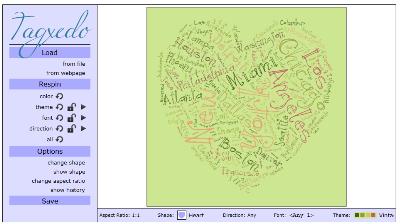
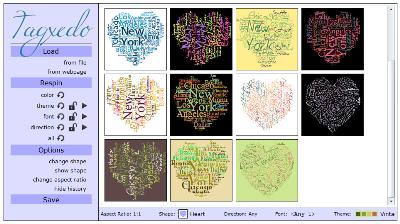
Tagxedo turns words -- famous speeches, news articles, slogans and themes, even your love letters -- into a visually stunning tag cloud, words individually sized appropriately to highlight the frequencies of occurrence within the body of text.

The following are screenshots of Tagxedo, in standard and history views.

  • Tagxedo screenshot, standard view

  • Tagxedo screenshot, history view

Twurdy


About Twurdy

The name "Twurdy" comes from a play on words with the question "Too Wordy?".

The philosophy

Everyone has different reading abilities. Some people searching the web are university professors and others are 5 year old children. Twurdy has been created to provide people with access to search results that suit their own readability level.

What does it do?

Twurdy uses text analysis software to "read" each page before it is displayed in the results. Then Twurdy gives each page a readability level. Twurdy then shows the readability level of the page along with a color coded system to help users determine how easy the page will be to understand.

The Goal

Twurdy's goal is to provide web searchers with information that is most appropriate for them. This will mean that 10 year olds doing school assignments don't have to click through difficult material to find something they can use. It will also mean that phd students do not have to click through websites designed for kids in order to find what they are looking for.

Thursday, April 15, 2010

Bubbl.us - brainstorming made simple

What is it?
Bubbl.us is a simple and free web application that lets you brainstorm online.
Why use bubbl.us?
Because you can:
  • Create colorful mind maps online
  • Share and work with friends
  • Embed your mind map in your blog or website
  • Email and print your mind map
  • Save your mind map as an image

And it's FREE!

Cacoo


Create diagrams online Real time collaboration

Cacoo is a user friendly online drawing tool that allows you to create a variety of diagrams such as site maps, wire frames, UML and network charts and MUCH more.
Cacoo can be used free of charge.

Tuesday, April 13, 2010

Teacher Zone

TenMarks
the most comprehensive library of math video lessons on the planet.  Grade K-12 with Algebra and Geometry.

Thursday, March 18, 2010

Free Online PDF Editor - Edit PDF on the Web - PDF Hammer

http://www.nitropdf.com/free/hammer/index.htm

Use PDF Hammer to quickly and easily edit your PDF files online without installing a thing! Simply upload PDF files to PDF Hammer via your web browser, perform your edits, and then save the files back to your computer. The online editor allows you to view the pages of your PDF files as you edit them. The free PDF editor lets you:

    * Combine PDF. Create single, polished PDF documents by merging multiple files
    * Edit PDF pages. Quickly rearrange, reorder, and delete the pages from existing PDF files.
    * Secure PDF. Protect the contents of PDF files with password-based security.
    * Update PDF metadata. Make PDF files more useful and usable by setting the document information (metadata) fields, including author, title, subject, and keywords.

PDF Hammer is 100% free and brought to you by the team behind Nitro PDF Professional -- the award-winning tool to edit PDF.

Get more free PDF Software

PDF to Word

Use our highly accurate PDF-to-Word converter to quickly and easily create editable DOC/RTF files.

PDF to Excel

Use the only free PDF-to-Excel converter out there create highly-editable XLS files.

PDF Download

Regain control over PDF files in Firefox with the PDF Download add-on.

PrimoPDF
Create PDF files from 300+ file types with the #1 free PDF converter.

PrimoOnline
Create PDF online for free without the need to install any software.

Monday, March 15, 2010

Celebrate Pi Day!

http://www.piday.org/

Pi, Greek letter (π), is the symbol for the ratio of the circumference of a circle to its diameter. Pi Day is celebrated by math enthusiasts around the world on March 14th. Pi = 3.1415926535…
With the use of computers, Pi has been calculated to over 1 trillion digits past the decimal. Pi is an irrational and transcendental number meaning it will continue infinitely without repeating. The symbol for pi was first used in 1706 by William Jones, but was popular after it was adopted by the Swiss mathematician Leonhard Euler in 1737. Learn more about Pi.